
Microsoft 365 Copilot is an AI-powered productivity app that helps users create content, organize information, summarize documents, and complete everyday work more efficiently. By combining AI assistance with productivity tools, the app supports a wide range of tasks, including writing, brainstorming, document editing, and information management.
Designed for professionals, students, and everyday users, Microsoft 365 Copilot offers an intuitive experience that helps simplify routine tasks while improving productivity. Users can ask questions, generate content, organize ideas, and receive AI-assisted suggestions through a conversational interface.
Whether you’re working on documents, preparing presentations, organizing notes, or managing projects, Microsoft 365 Copilot provides flexible tools to support your daily workflow.
What Makes Microsoft 365 Copilot Useful?
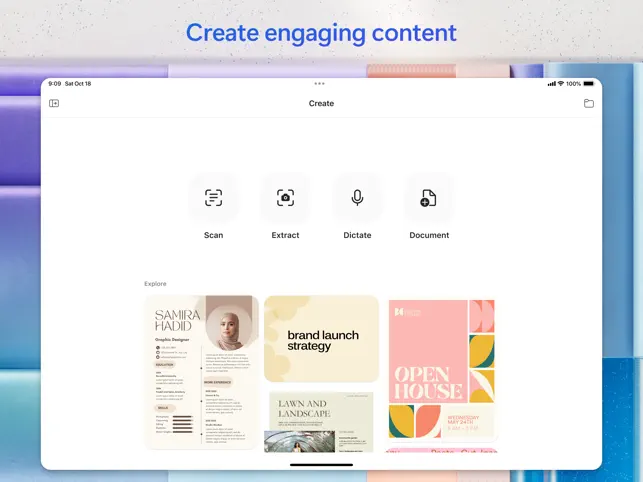
One of the biggest strengths of Microsoft 365 Copilot is its AI-powered writing assistance. Users can generate drafts, improve existing content, rewrite text, and organize information more efficiently. This helps reduce the time needed for creating reports, emails, meeting notes, and other documents.
The app also supports summarization features. Long documents, discussions, or collections of information can be condensed into shorter summaries, making it easier to review important details.
Another valuable feature is idea generation. Users can brainstorm topics, outline projects, organize plans, and receive suggestions that support creative thinking and problem-solving.
Microsoft 365 Copilot also assists with everyday productivity by helping users organize information, answer questions, and improve document quality through AI-generated recommendations.
The clean interface and conversational design make it easy for both new and experienced users to begin using AI assistance without a complicated learning process.
How to Use Microsoft 365 Copilot
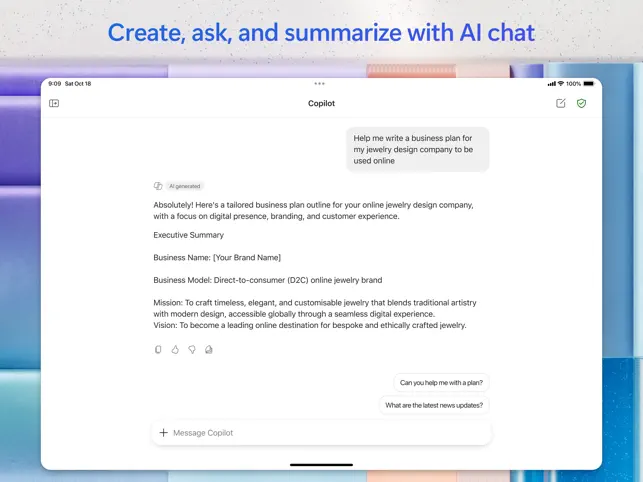
Getting started is straightforward. After opening the app, users can enter a prompt, question, or task into the AI chat interface.
Users may ask for writing assistance, request summaries, organize ideas, or seek explanations on a variety of topics. Providing clear instructions often helps generate more relevant responses.
The conversational format allows users to continue asking follow-up questions, refine previous answers, or expand existing content without starting a new conversation.
For writing projects, users can specify the desired tone, structure, or length to receive content that better matches their goals.
As users continue exploring different prompts and tasks, they can discover additional ways the app supports productivity across work, education, and personal projects.
Tips to Get the Most Out of Microsoft 365 Copilot
Write clear and detailed prompts whenever possible. Specific instructions often produce more accurate and useful responses.
Break larger projects into smaller tasks. Working step by step makes it easier to organize information and review AI-generated content.
Carefully review generated text before using it in important documents. Small edits can help ensure the final version matches your preferred style and purpose.
Experiment with different types of requests, including writing, summarizing, brainstorming, planning, and information organization, to discover the app’s full range of capabilities.
Use follow-up prompts to improve responses or request additional details instead of starting over with a completely new prompt.
Finally, continue exploring new features as they become available to take advantage of ongoing improvements and expanded AI capabilities.
Work Smarter with AI Assistance
Microsoft 365 Copilot combines AI-powered writing, information management, brainstorming, and productivity tools into a flexible solution for everyday tasks. With an intuitive interface and a wide range of practical features, the app helps users create content, organize ideas, and manage information more efficiently.
Whether you’re preparing documents, generating ideas, summarizing information, or improving your daily workflow, Microsoft 365 Copilot provides AI-powered support designed to simplify your work. Its combination of intelligent assistance and productivity features makes it a valuable companion for modern work, study, and personal organization.